Import or Upload Data
The first step in using the Make BLAST Database block is importing a FASTA file to construct a local database. The makeblastdb command within the workflow uses this file as its input. This involves two key requirements:
- Platforma must bring this file into the working directory when executing the command.
- Platforma must store this file in persistent storage to avoid re-importing or re-uploading it each time the user re-runs the block with different options.
To facilitate this, the Platforma SDK provides a straightforward method to import data into its main persistent storage and use the data alongside the commands within the workflow.
Data import mechanics
Platforma offers several ways to import data:
- Upload directly from the user's computer.
- Import data from configured Data Library storages.
- Import data from external permitted databases (e.g., SRA).
The imported data is stored in the primary storage configured in Platforma Backend. Only data existing in the primary storage can be used within the workflow during command execution.
The process of importing data from external sources to the primary storage is initiated in the block's workflow. The arguments of the workflow must include the identifier of the file the user intends to import (either a local file for upload or a file from the library). This identifier is automatically assigned by the user interface if the standard UI controls for file input are used.
Below, we describe the details of data import in the UI, model, and workflow.
User interface
The Platforma SDK offers a specialized PlFileInput component that allows users to select a file for import:
<PlFileInput
  v-model="app.model.args.fastaFile"
  :progress="app.model.outputs.importProgress"
  :extensions="['fasta', 'fa', 'fna']"
  label="FASTA source"
  placeholder="Select .fasta file"
  fileDialogTitle="Select fasta file"
  clearable
/>
The file dialog allows users to select local files from their computer or choose files from library storages configured via the backend's Data Library storage. Selecting a local file initiates an upload process to transfer the file to the backend's primary storage. Conversely, selecting a file from a library storage triggers an import process to move the file to the primary storage. In both scenarios, the upload/import process is initiated by the workflow, with the Platforma SDK providing a unified API to manage both operations seamlessly.
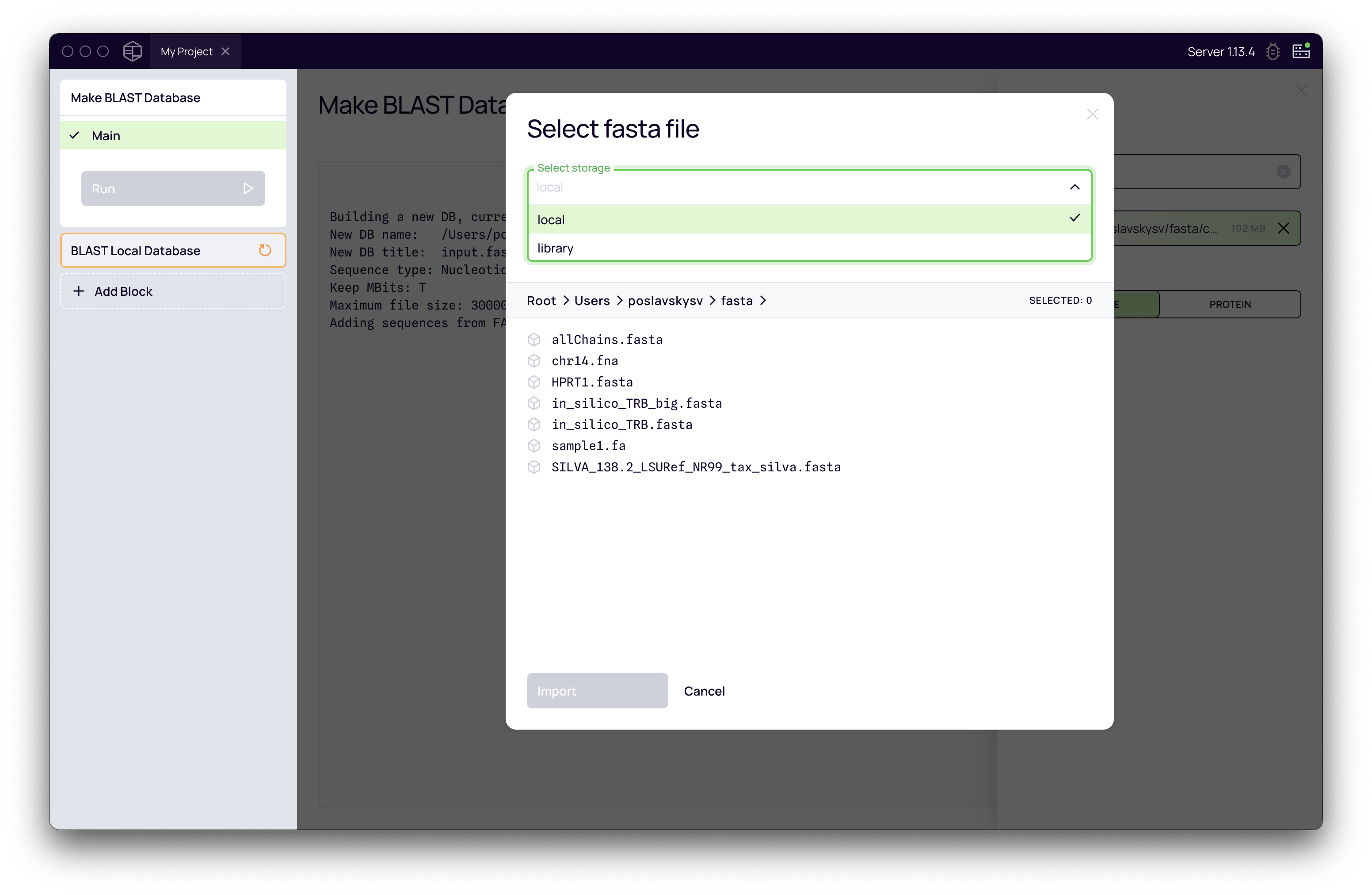
The file input dialog can be customized with various optional properties, such as dialog labels and allowed file extensions. Two properties are mandatory:
-
v-model: This is set to the workflow argument representing the file's unique identifier (app.model.args.fastaFile). When a user selects a file, its identifier is stored in the specified argument by the component. -
:progress: This is set to the output that indicates the upload/import progress (app.model.outputs.importProgress), which is provided as an output from the workflow.
Model
Within the block arguments, define a fastaFile argument using the built-in type ImportFileHandle:
import { BlockModel, ImportFileHandle, InferOutputsType } from '@platforma-sdk/model';

export type BlastAlphabetType = 'prot' | 'nucl';

export type BlockArgs = {
  // Database title
  title?: string;
  // Reference FASTA
  fastaFile?: ImportFileHandle;
  // Alphabet type
  dataType: BlastAlphabetType;
};
The ImportFileHandle type is essentially a string representing a Uniform Resource Identifier (URI) of a file.
The workflow triggers the upload/import process using the file's URI and outputs a special resource (fastaHandle) that manages the import. This resource offers an API for monitoring the current import progress. In the model, we use this resource to produce an output for the UI:
.output('importProgress', (ctx) => ctx.outputs?.resolve('fastaHandle')?.getImportProgress())
Here, ctx.outputs?.resolve('importHandle') retrieves the fastaHandle resource provided by the workflow, and the getImportProgress() method retrieves a progress object which can be used with the :progress property of the PlFileInput control.
Workflow
The workflow is responsible for initiating the upload or import process. This is done using the file library:
file := import("@platforma-sdk/workflow-tengo:file")
It provides the importFile(uri) method, which initiates an upload or import based on the file source (local or library storage):
fImport := file.importFile(args.fastaFile)
Under the hood, the workflow allocates two resources associated with the file:
-
fImport.file: The resulting file resource, representing the imported file stored in the primary storage. -
fImport.handle: A resource that manages the file upload or import process ("handle").
The fImport.file resource can now be used as input to the makeblastdb command, and fImport.handle is returned as part of the block results.
See complete workflow
wf.body(func(args) {

  fImport := file.importFile(args.fastaFile)

  makedb := exec.builder().
    cmd("makeblastdb").
    arg("-in").arg("input.fasta").
    arg("-parse_seqids").
    arg("-out").arg("db").
    arg("-dbtype").arg(args.dataType).
    arg("-blastdb_version").arg("5").
    addFile("input.fasta", fImport.file).
    saveFileSet("db", "^db.*").
    printErrStreamToStdout().
    cache(48 * times.hour).
    run()

  dbFiles := makedb.getFileSet("db")

  return {
    outputs: {
      fastaHandle: fImport.handle,
      log: makedb.getStdoutStream()
    },
    exports: {
      db: {
        data: dbFiles,
        spec: {
          kind: "fileSet",
          annotations: {
            "pl7.app/type": "blastDB",
            "pl7.app/label": args.title,
            "pl7.app/blast/alphabetType": args.dataType,
            "pl7.app/blast/dbTitle": args.title
          }
        }
      }
    }
  }
})